Posts

Showing posts with the label postman

Integrate Postman with Jenkins on windows machine

Image
Integrate Postman with Jenkins on Windows Machine Step #1 : Download Jenkins on your local windows machine . URL to Download Jenkins :-- https://jenkins.io/download/ After successful download enter :-  http://localhost:8080 Step #2 : Enter the name of the project and click on Freestyle project and save . Step #3 : PostmanScriptTest2 job  gets created and under source code management >build > click on execute windows batch command. Step #3: Type in command under Execute Windows batch Command C:\Users\ashish\AppData\Roaming\npm\newman run https://www.getpostman.com/collections/d231549a4assc77abcdbaf9c674  Click on save and apply. Step #4: Go to Jenkins Home Page and click on Manage Jenkins Step #5 : Under manage Jenkins click on configure System . Step #6 : Under Global Properties > check on environmental variables and enter  Name - PATH  Value - C:\Program Files\Nodejs Step #7 : Under Shell , shel...
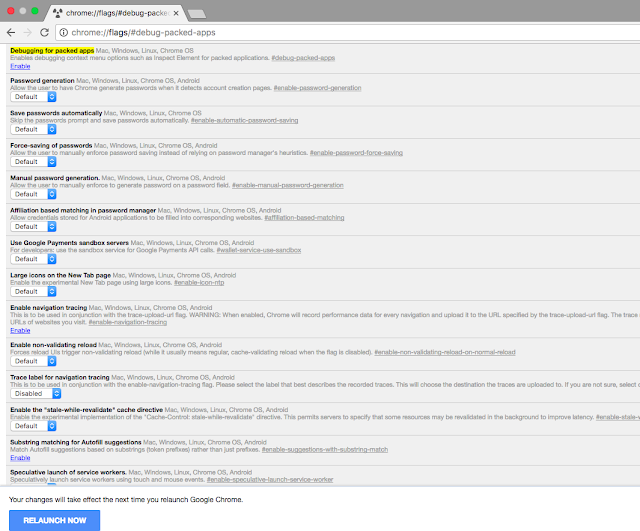
How to enable Inspect element in Postman

Image
How to enable Inspect element in Postman  Step 1: Open your chrome browser and type the following code in url  chrome://flags/#debug-packed-apps Under Debugging for packed apps click on Enable Link . and then click RELAUNCH NOW button Step 2 : Open your Postman app and right click on the window and click on inspect . refer Snapshot  Now you can easily check what all requests being hit on the server with request formation . 2 In case you are unable to see the requests and response in the inspect element you could try below steps . You can head to chrome://extensions, enable 'Developer Mode', and search for the Interceptor. Click the "Inspect views: background.html" link to open DevTools. You should see the requests and responses in the Interceptor's DevTools window when you make requests through Postman.

Constructing Curl from Python , HTTP , PHP , Java Request

Image
Constructing Curl from Python , HTTP , PHP , Java Request      Constructing curl , python request , PHP ,JAVA Open postman client and click on code [Below save button ] refer snapshot . when click on code another window appears . refer snapshot . similarly ,  you can generate various other request [curl , python ,java , php ] refer snapshot Constructing HTTP request from curl request >> 1. Click on import >> Paste Raw Data Text , paste curl request , refer snapshot