Posts

Mongo Db Moitoring with mongotop Command
Image
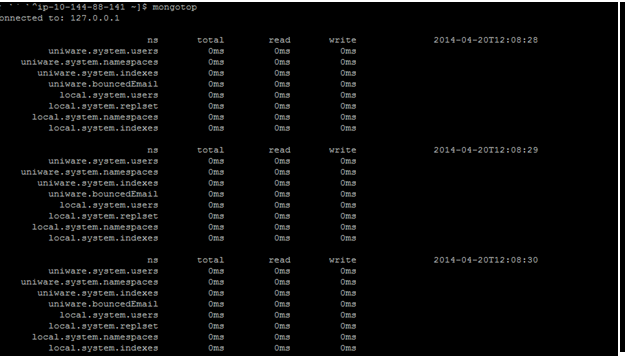
Mongo Db monitoring with mongotop command mongotop provides a method to track the amount of time a MongoDB instance spends reading and writing data. mongotop provides statistics on a per-collection level. By default, mongotop returns values every second. Mongotop  Options --help, -h  |Returns information on the options and use of mongotop. --verbose, -v  |Increases the amount of internal reporting returned on standard output or in log files. Increase the verbosity with the -v form by including the option multiple times, (e.g. -vvvvv.) --quiet  |Runs the mongotop in a quiet mode that attempts to limit the amount of output. This option suppresses: output from  database commands replication activity connection accepted events connection closed events --version| Returns the mongotop release number. Fields in mongotop mongotop.ns  -- Contains the database name...
Regular Expressions

Regular Expression  1. Using Regular Expression for matching Email  ^\w+@\w+\.\w{3}$ ashish@abc.com ^\w+@[\w.]+\.\w{2,3}$ ashish@abc.co.in  ^[\w%.+\-]+@[\w.\-]+\.[A-Za-z]{2,3}$ ashish@abc.co.in  ashish@abc.co.uk ashsih@abc.com 2. Using Regular Expression for matching URL  ^http(s?):\/\/[\w.\-]+\.[\w]+.*$ tps://asbjb.com http://12.22.11.111 https://bdbndbd.ccbcb.skns/pwwknw/?sss.html http://vulcan-olpite.unicommerce.info:8080/fleet/riders?offset=0&limit=10&keyword=&sort_direction=1&sort_by=code https://www.blogger.com/blogger.g?blogID=6445636638945131440#editor/target=post;postID=1834207132756697935 3. Using Regular Expression for matching Decimal ^\d*\.\d+|\d+$ .12 0.12 12 2.13  4. Using Regular Expression for matching Time ^([01]?[0-9]|2[0-3]):[0-5][0-9](:[0-5][0-9])?(( EST)|( GMT -5)|(AM|PM|am|pm))?$ 2:35 2:35PM 2:35pm 02:35 14:25 14:24:23 12:23 EST 12:...

How to enable Inspect element in Postman

Image
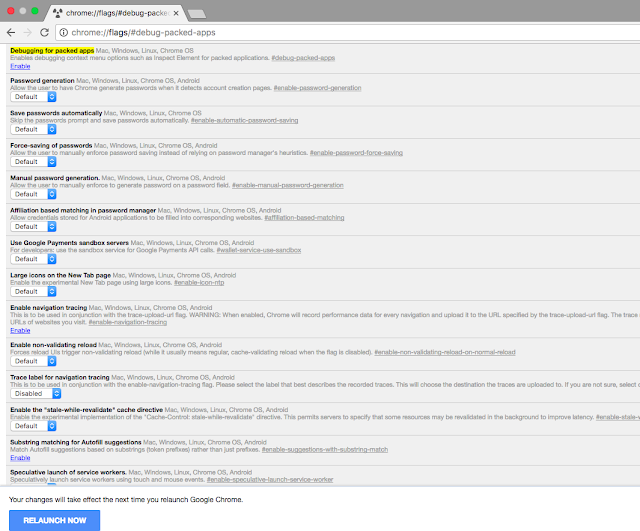
How to enable Inspect element in Postman  Step 1: Open your chrome browser and type the following code in url  chrome://flags/#debug-packed-apps Under Debugging for packed apps click on Enable Link . and then click RELAUNCH NOW button Step 2 : Open your Postman app and right click on the window and click on inspect . refer Snapshot  Now you can easily check what all requests being hit on the server with request formation . 2 In case you are unable to see the requests and response in the inspect element you could try below steps . You can head to chrome://extensions, enable 'Developer Mode', and search for the Interceptor. Click the "Inspect views: background.html" link to open DevTools. You should see the requests and responses in the Interceptor's DevTools window when you make requests through Postman.

Automate Rest Api's using Python

Automate Rest Api's using Python  Automation of rest API using python is done by inbuilt library of python , Python package index Request Installation Installing Requests via pip is fairly simple, just run this in your terminal. $ pip install requests For more detailed documentation refer http://docs.python-requests.org/en/master/ Sample Code import requests url = "http:// vulcan-olpstaging.unicommerce.info:8089 /trips/lastmile" headers = {     'content-type': "application/json",     'cache-control': "no-cache",     } payload ={ "pyMessage": { "Tasks": [{ "Task": { "CONSIGNE_STATE": "Delhi", "CONSIGNE_NAME": "sonu sharma", "WIDTH": 10.0, "CREW_CODE": "OLP9876", "TRIP_TYPE": "FWD", "TASK_ACTION": "ADD", "DATE": "2016...

Constructing Curl from Python , HTTP , PHP , Java Request

Image
Constructing Curl from Python , HTTP , PHP , Java Request      Constructing curl , python request , PHP ,JAVA Open postman client and click on code [Below save button ] refer snapshot . when click on code another window appears . refer snapshot . similarly ,  you can generate various other request [curl , python ,java , php ] refer snapshot Constructing HTTP request from curl request >> 1. Click on import >> Paste Raw Data Text , paste curl request , refer snapshot  

Testing SOAP API using JMETER

Image
Testing SOAP API using JMETER I would like to demonstrate Testing of SOAP API's in Jmeter . Let's take an example of below soap request to be tested . End Point of the Soap API : - https://${Staging}:443/services/soap/?version=1.6&facility=04 Soap Request:- <soapenv:Envelope xmlns:ser="http:// uniware.unicommerce.com /services/" xmlns:soapenv="http://schemas.xmlsoap.org/soap/envelope/">    <soapenv:Header>       <wsse:Security soapenv:mustUnderstand="1" xmlns:wsse="http://docs.oasis-open.org/wss/2004/01/oasis-200401-wss-wssecurity-secext-1.0.xsd" xmlns:wsu="http://docs.oasis-open.org/wss/2004/01/oasis-200401-wss-wssecurity-utility-1.0.xsd">          <wsse:UsernameToken wsu:Id="UsernameToken-1">             <wsse:Username>testing</wsse:Username>             <wsse:Password Type="http://docs.oasis-ope...

How To Automate Rest API in Postman

Image
How To Automate Rest API  in Postman  1.  Let us take an example in which we need to create shipment  Step 1 : login via username /password and then getting the access token in response . [ Login API ] Step 2 : Creating the shipment each time with unique AWB no . [ automating AWB no in request ] and passing the access token in header generated via Step 1.   login API POST Request http://XXX/oauth/token?grant_type=password&client_id=my-trusted-client&username=user1&password=pass1 Header Content-Type : Application/json Response {   "access_token": "eyJhbGciOiJIUzI1NiJ9.eyJleHBpcmF0aW9uIjoxNDc3MzE1NjMyMjc1LCJpc3N1ZWRBdCI6MTQ3NzMwNTYzMjI3NSwiaXNzdWVyIjoiT2xwQXV0aCIsInR5cGUiOiJhY2Nlc3NfdG9rZW4iLCJpc3N1ZWRGb3IiOiJha3NoYXkuYWdhcndhbEB1bmljb21tZXJjZS5jb20iLCJvdGhlckNsYWltcyI6e319.EmWoYEOXRjlloZlfM9ggHftxmnlowzPxFI9gPOAOnBk",   "token_type": "bearer",   "refresh_token": "eyJhbGciOiJIUzI1NiJ9.eyJleHBpc...